Free handwriting repeater
Write or type a letter, word or sentence into the handwriting repeater, then press Rewrite! to watch it written again, stroke by stroke. Trace it, repeat it down the page and print it as a practice sheet. It works for a child’s name, this week’s spelling words, cursive joins or a short sentence of your own.
- Free to use
- No sign-up
- Works on iPad, Android and Chromebook
- Prints on A4
- Nothing is uploaded
What is a handwriting repeater?
A handwriting repeater is an online writing board that plays writing back stroke by stroke, in the order it was written. Some people call it a writer repeater. Instead of only seeing what a letter looks like, you watch where the pen starts, which way it moves and where it lifts off.
That matters because most handwriting problems are about movement, not shape. A child who writes a lower-case d by drawing the stick first will keep doing it on a printed worksheet. Watching the letter formed slowly, starting with the round part, and then tracing it, helps break that habit.
This handwriting repeater can also write typed text in handwriting, copy your own handwriting down the page, fade writing into a dotted guide for tracing and score how well you traced it.
How to use the handwriting repeater tool
Six steps. Most people have the hang of it within a minute.
-
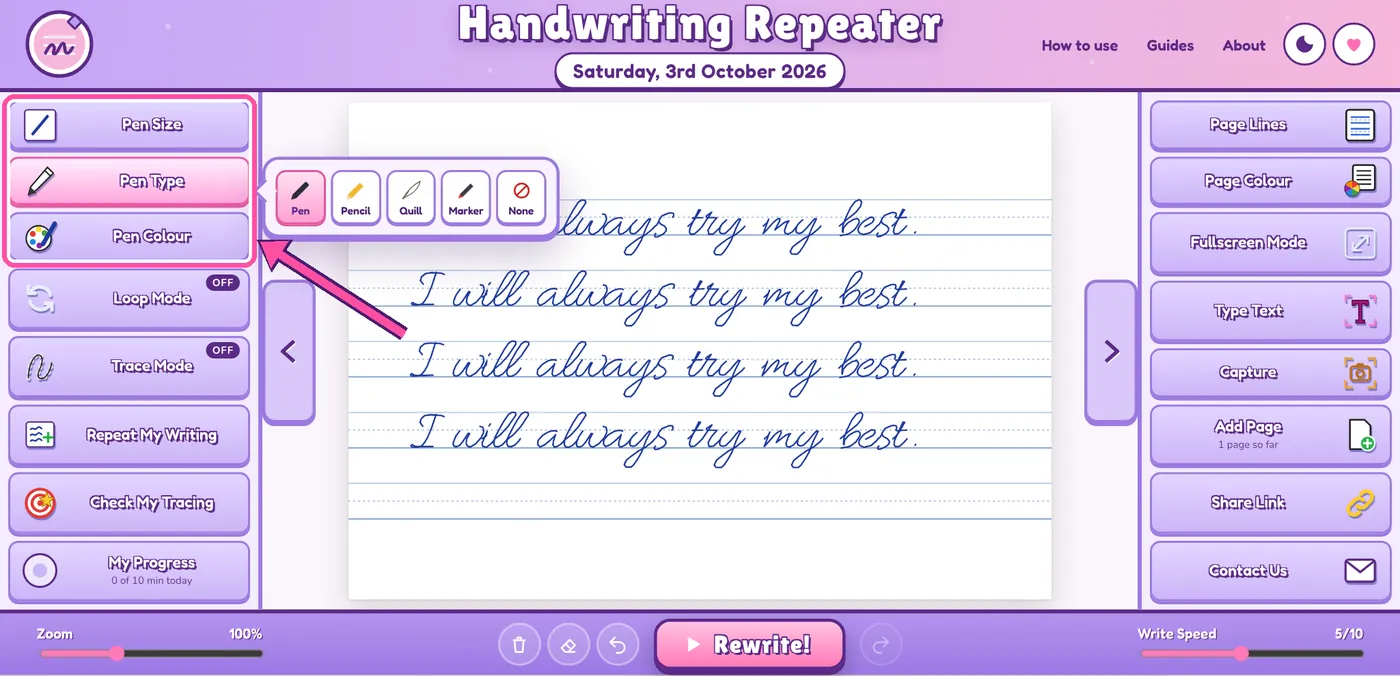
Step 1: Choose your pen
In the left panel, pick a nib size, a pen type (pen, pencil, quill or marker) and an ink colour.
Tip: younger children find a large pencil easier to follow. Older pupils usually want black or blue, as most schools ask for one of those.
-
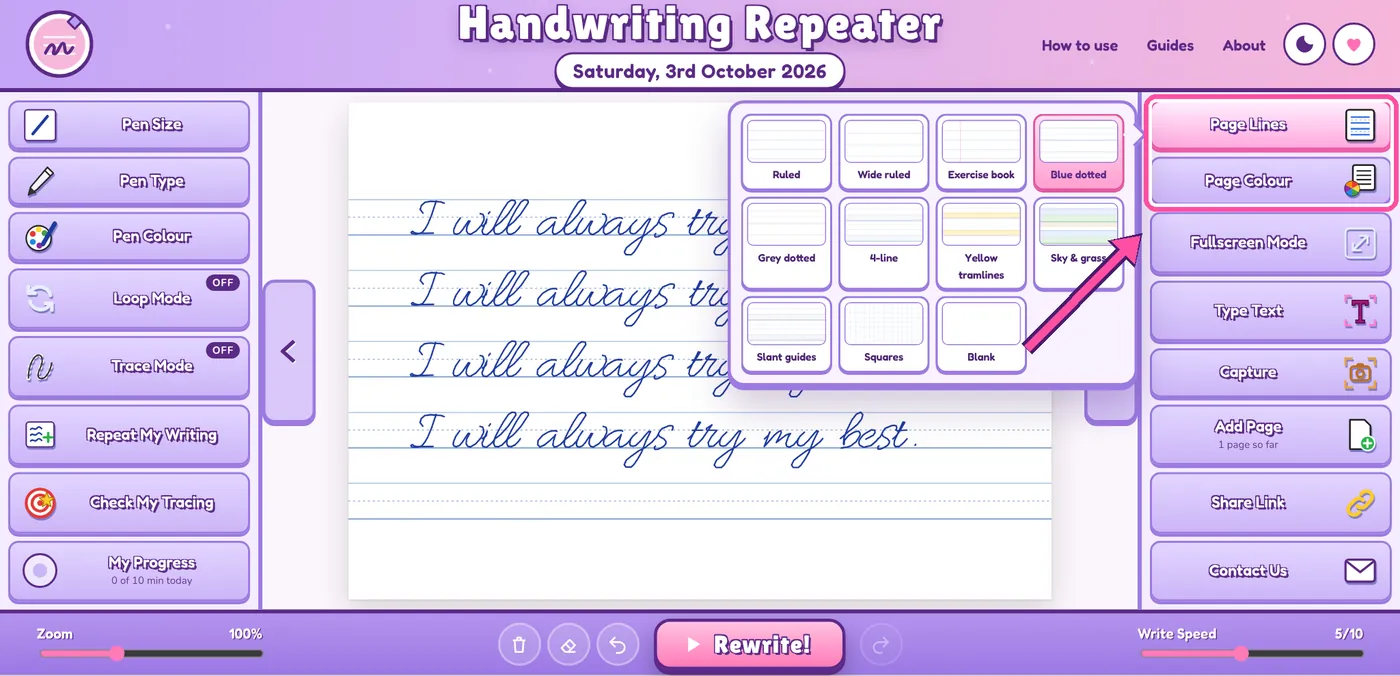
Step 2: Pick your page lines and colour
Open Page Lines and choose from eleven styles, such as dotted midlines, 4-line paper or sky-and-grass lines. Change the Page Colour if white feels too bright.
Tip: if your child reads with a coloured overlay, try the page colour that matches it.
-
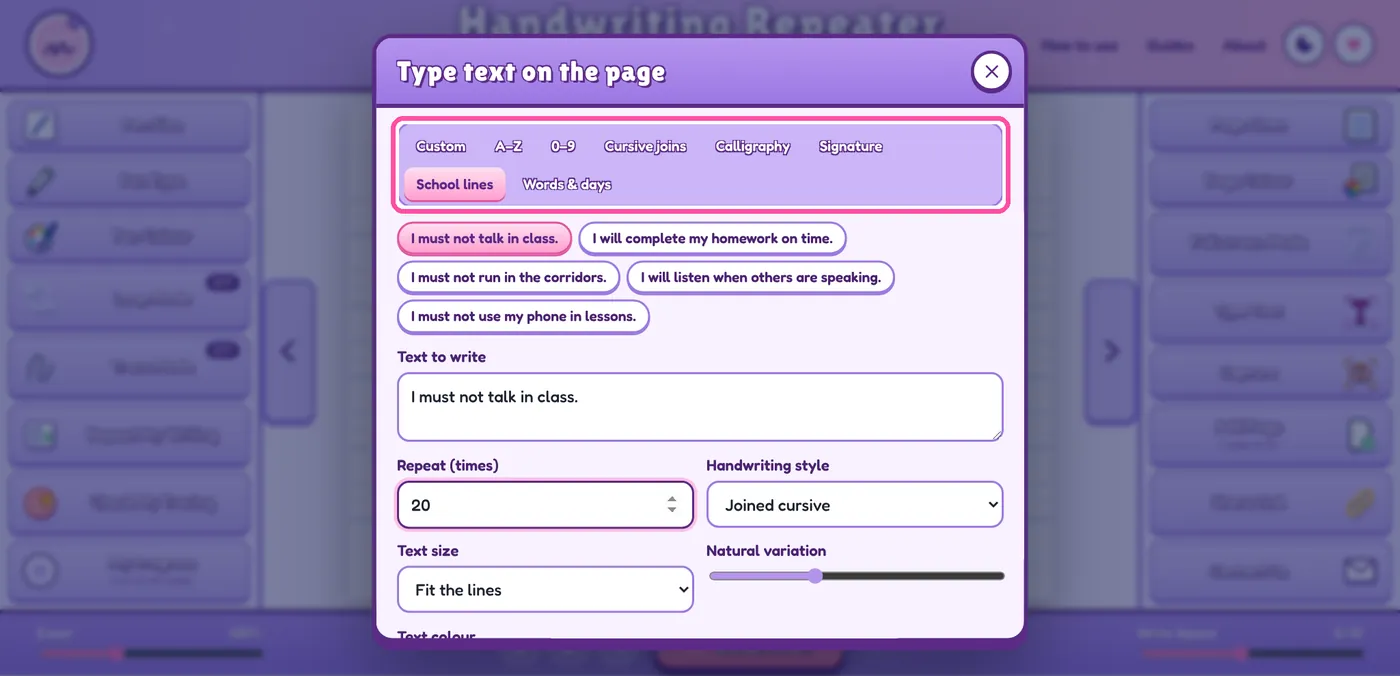
Step 3: Write on the page, or type your text
Write with a finger, stylus or mouse. Or press Type Text, type or paste your words, choose how many times to repeat them and pick one of six handwriting styles.
Tip: choose Worksheet under “Place as” to get a model line, a faded line to trace and a blank line to copy on.
-
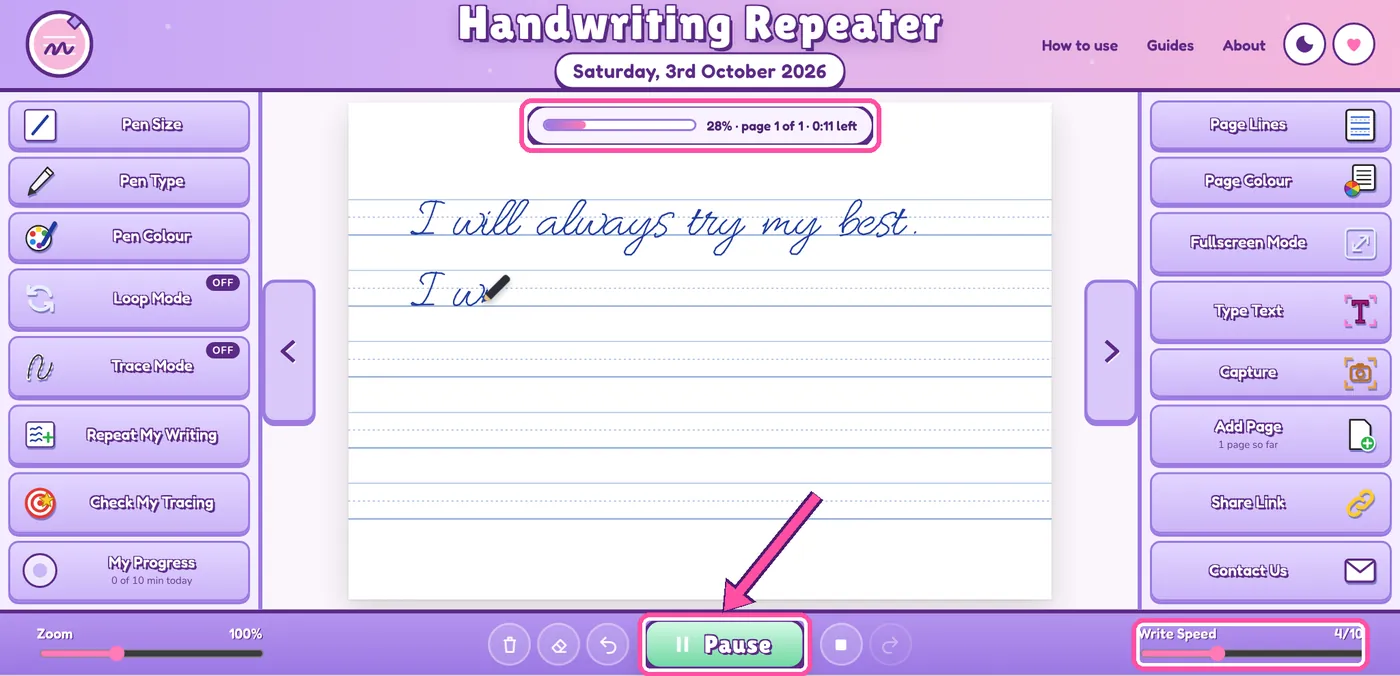
Step 4: Press Rewrite! and set the speed
Press Rewrite! to watch everything written again in order. Lower the Write Speed to study each stroke, or raise it to fill the page quickly.
Tip: turn on Loop Mode to keep the writing replaying on a whiteboard while pupils copy it.
-
Step 5: Trace it, repeat it, check it
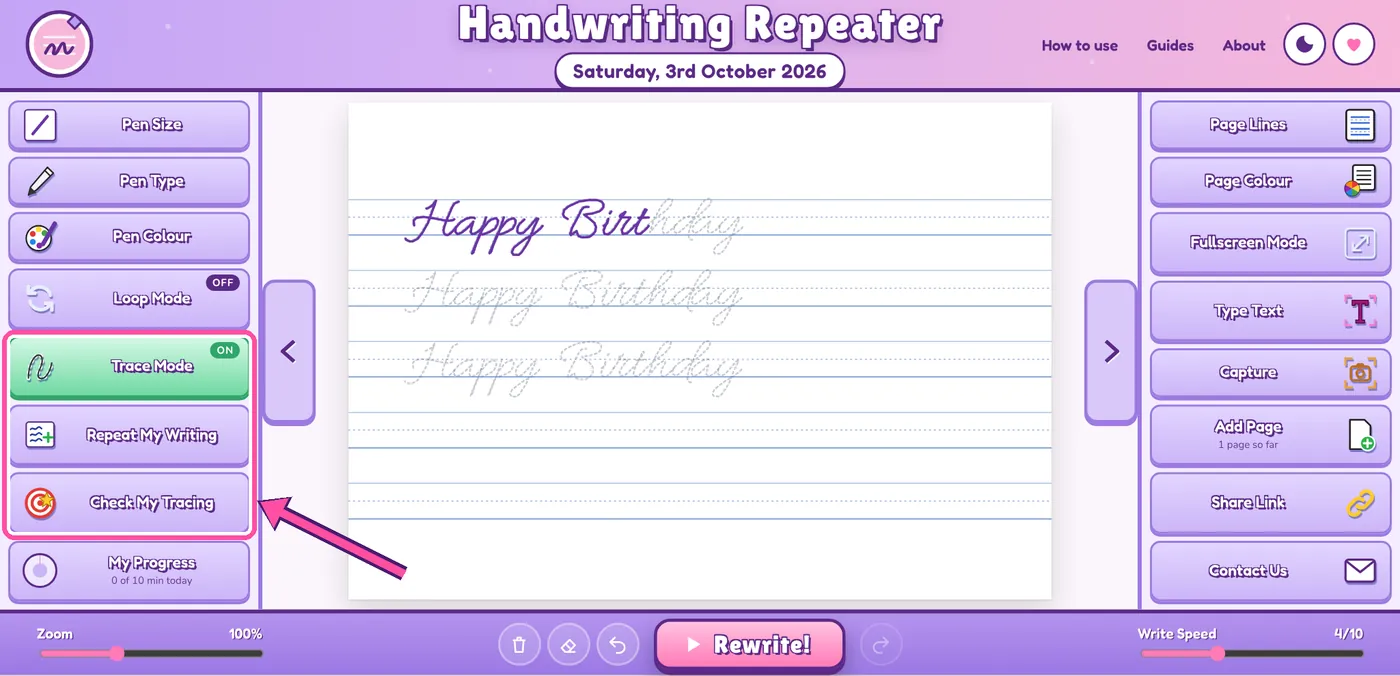
Turn on Trace Mode to fade the writing into a dotted guide, trace over it, then press Check My Tracing for a score out of 100. Orange dots show where you went off the guide.
To repeat your own handwriting, write one line and press Repeat My Writing. Each copy comes out slightly different, so it still looks hand-written.
-
Step 6: Save, print or share
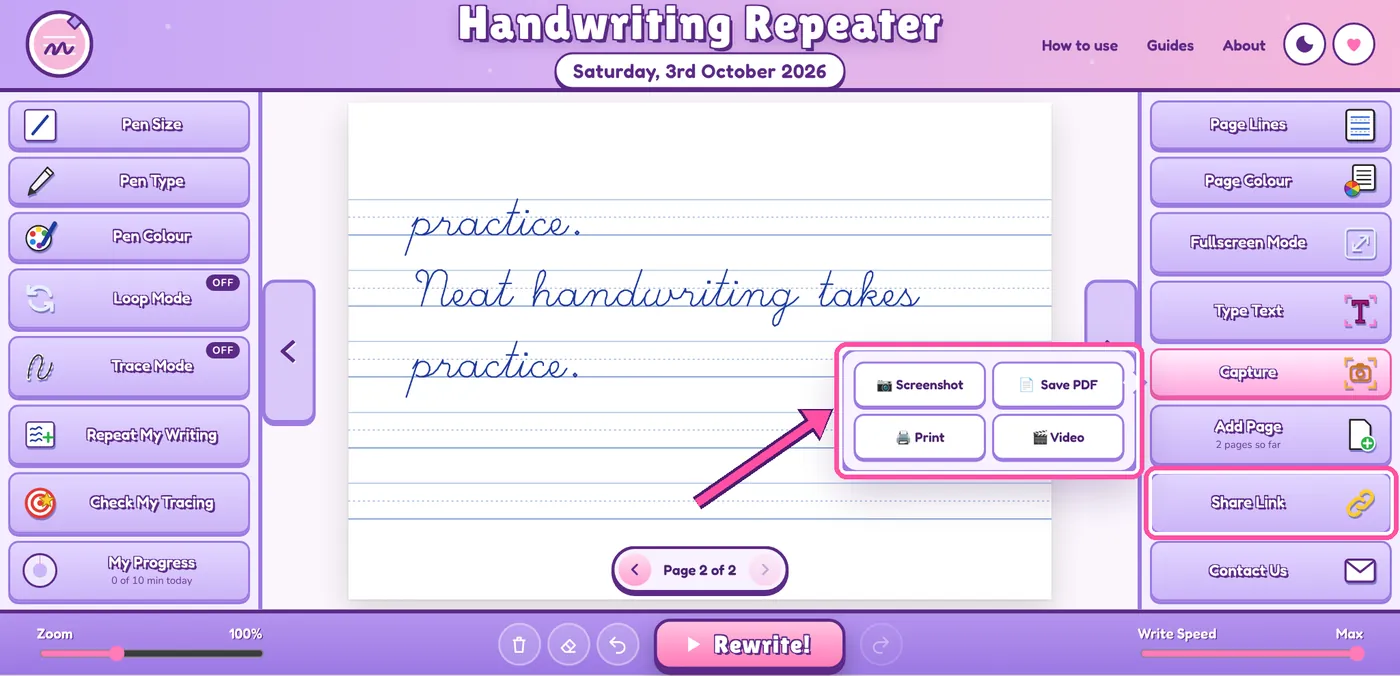
Open Capture to save a PDF, take a screenshot, print on A4 or record a video. Share Link copies a link that opens your text and settings on another device.
Tip: the page clears when you leave the site, so save a PDF of anything you want to keep.
What you can do with this writer repeater
Every feature is free. There’s no premium version and no usage limit.
Watch letters being formed
See where each letter starts and which way it goes, at any speed.
Turn typing into handwriting
Spelling words, a name or a sentence, in six handwriting styles.
Repeat your own writing
Write one neat line and copy it down the page.
Score your tracing
A mark out of 100, with the parts you missed shown in orange.
Keep a daily streak
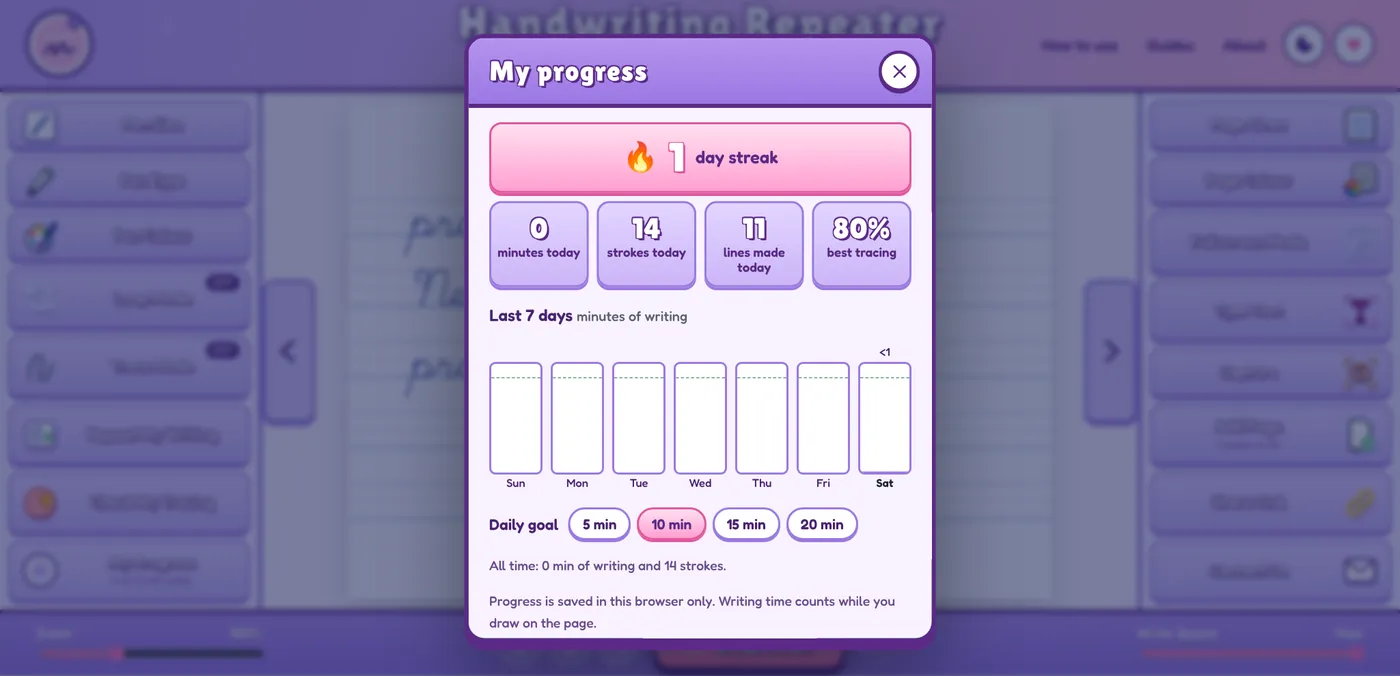
Minutes practised, a seven-day chart and a daily goal.
Print practice sheets
Model, trace and copy lines, ready to print.
Match your school’s lines
11 line styles and 7 page colours, from Reception to secondary.
Keep it private
No account, and nothing leaves your device.
Who uses a handwriting repeater?
Parents: extra practice at home
Make a short sheet from this week’s spelling words or your child’s name and work through it in ten minutes after school. On a tablet, you don’t need to print anything.
Teachers: worksheets and modelling
Put the rewrite on the whiteboard in Loop Mode while pupils copy at their desks. Make a different sheet for each group and send the same task home with a share link.
Primary pupils: letters the right way round
A child who mixes up b and d can watch both letters formed slowly, trace them, then practise words such as bed, dab and bird.
Secondary pupils: neat writing at speed
Repeat a sentence on exercise-book lines and raise the Write Speed a little each week, so joined handwriting stays readable in timed essays and exams.
Children who find handwriting hard
Use a tinted page, extra-large lines and a slow replay. Short sessions with a score at the end keep the effort manageable.
Adults: rebuilding handwriting
Years of typing can leave writing cramped and slow. Trace a neat model, then practise a new style, your signature or calligraphy.
The handwriting repeater is a practice tool, not a replacement for specialist help. If you’re worried about your child’s handwriting, speak to their teacher or the school’s SENCo, who can arrange an assessment if your child needs one.
How to practise cursive writing with the repeater
UK schools usually call cursive writing joined handwriting, and most pupils start learning joins in Year 2. Practise one join at a time rather than random words. If a pupil is working on the in join, for example, use words such as pin, tin, rain and inside.
- Press Type Text, open the Cursive joins tab and pick a set, or type your own words.
- Choose Joined cursive and set the page to 4-line or Slant guides.
- Press Rewrite! with Write Speed on 2 or 3 and watch each join leave one letter and enter the next.
- Trace the line three times in Trace Mode, then write it once without the guide.
| Join family | Examples to practise |
|---|---|
| Diagonal join to a short letter | in, an, um, cu, du |
| Diagonal join to a tall letter | ab, it, ul, ch, th |
| Horizontal join to a short letter | oa, ou, ow, vi, ro |
| Horizontal join to a tall letter | ol, ob, wh, rt, of |
Learn the families in this order, and keep to the style your child’s school teaches.
Handwriting by year group, and the settings to try
The national curriculum in England sets out what pupils learn about handwriting in each year group. Match the settings to your child’s stage.
| Year group | What pupils learn | Settings to try |
|---|---|---|
| Reception | Write recognisable letters, most of which are correctly formed. | Sky & grass lines, large pencil, A–Z tracing at a slow speed |
| Year 1 | Sit correctly and hold a pencil comfortably. Form lower-case letters in the correct direction, starting and finishing in the right place. Form capital letters and the digits 0 to 9. | Trace Mode, A–Z and 0–9 sets, Write Speed 2 or 3 |
| Year 2 | Form lower-case letters of the correct size relative to one another. Start using some of the diagonal and horizontal strokes needed to join letters. | 4-line paper, Cursive joins set, Worksheet mode |
| Years 3 and 4 | Use the diagonal and horizontal strokes needed to join letters, and understand which letters are best left unjoined. Increase legibility, consistency and quality. | Slant guides, Joined cursive style, Check My Tracing |
| Years 5 and 6 | Write legibly, fluently and with increasing speed, choosing which letter shapes to use and whether to join specific letters. | Blue dotted lines, Repeat My Writing, faster Write Speed |
These stages follow the national curriculum in England and the EYFS framework. Scotland, Wales and Northern Ireland have their own curricula, but pupils there learn the same skills.
A 10-minute daily handwriting routine
Little and often works better than one long session. This routine fits in before school or straight after tea.
- 1 min
Warm up
Stretch the fingers, check the pencil grip and sit with both feet flat on the floor.
- 2 min
Watch
Type today’s letter and a few words that use it, then press Rewrite! at a slow speed. For lower-case r, try the letter on its own, then rain, rabbit and red.
- 3 min
Trace
Turn on Trace Mode, trace the line three times, then press Check My Tracing.
- 3 min
Write
Write the line without the guide, on screen or on paper.
- 1 min
Review
Open My Progress, check the streak and choose tomorrow’s letter.
Which page lines should you choose?
The right lines help children keep letters the right size and evenly spaced. Younger pupils usually start on wide lines with a midline, then move to narrower lines once their writing is steady.
| Line style | Best for |
|---|---|
| Blue or grey dotted | Everyday practice. The dotted midline shows how tall small letters should be. |
| 4-line | Letter heights. Tall letters, small letters and tails each have their own band. |
| Yellow tramlines | A shaded band for small letters, used in many UK primary schools. |
| Sky & grass | Reception and Year 1. Tall letters reach the sky, small letters sit on the grass and tails go underground. |
| Slant guides | Keeping an even slope in joined handwriting. |
| Exercise book | Older pupils. It has a red margin, like a school exercise book. |
| Ruled and wide ruled | Faster writing, notes and longer passages. |
| Squares | Numbers, maths layout and even letter spacing. |
| Blank | Signatures, calligraphy and drawing. |
Quick tips for neater handwriting
- Hold the pencil lightly. If the fingertips go white, the grip is too tight, and that’s what makes hands ache.
- Tilt the paper. Right-handers turn it slightly to the left. Left-handers turn it to the right and hold the pencil a little higher, so they can see what they’ve written.
- Keep small letters the same height. Writing looks neat when the letter sizes match.
- Sit every letter on the line. Letters that float above the line look untidy, even when they’re well formed.
- Leave a finger space between words. Even gaps make writing much easier to read.
- Slow down first. Practise slowly and correctly. Speed comes once the movement is automatic.
Been set lines to write?
Some UK schools still use imposition writing, usually called lines, as a sanction. If your teacher expects them handwritten, they need to be in your own handwriting. You can use the handwriting repeater to make a neat model to copy and to build up your writing speed.
Is this handwriting repeater online safe for children?
- No account and no personal details. Children can start straight away, at home or at school.
- Nothing is uploaded. Writing, typed text and drawings stay in your browser and never reach a server.
- No chat or social features. Nobody can contact your child through the tool.
- The page clears when you leave. Only practice statistics, such as the streak, stay on your device.
Read our privacy policy for full details.
Handwriting repeater FAQs
Is this handwriting repeater free?
Yes. Every feature is free, with no premium version and no limit on how often you use it. There’s nothing to download and no account to create.
Does a writer repeater actually improve handwriting?
Yes, if you write along with it. A writer repeater shows where each letter starts, which way the pen moves and the order of the strokes, which is where most children go wrong. The progress comes from tracing the guide and then writing the line on your own. Ten minutes a day works better than one long session, so try the daily routine above.
How do I make a handwriting worksheet?
Press Type Text, enter your words, choose a handwriting style and pick Worksheet under “Place as”. You’ll get a model line, a faded line to trace and a blank line to copy on, repeated down the page. Then open Capture and save it as a PDF or print it.
How many times can I repeat a sentence?
Type Text repeats a sentence up to 500 times, and Repeat My Writing copies your own line up to 300 more times. The tool adds new pages as the writing fills them, up to 30 pages.
Can I save my writing as a PDF, image or video?
Yes. Open Capture in the right panel. Save PDF gives you every page at A4 size, Screenshot saves the current page as a PNG image and Print sends the pages to your printer. Video records the writing as it plays back, and works in Chrome, Edge and Firefox.
Can I use it for school lines or impositions?
Yes, as a model to copy from and for speed practice. If your teacher wants the lines in your own handwriting, copy them onto paper yourself. A printed page won’t count, and most teachers will spot it.
Does it work on an iPad, Android tablet or Chromebook?
Yes. It runs in any up-to-date browser, including Safari, Chrome and Edge. On a tablet, write with a finger or a stylus. On a phone, the Tools and Page buttons at the bottom open the pen and page settings.
Which handwriting style do UK schools teach?
There’s no single national style. Each school chooses its own handwriting scheme, and many teach print first and joined handwriting from Year 2. Ask your child’s school which style they use, then pick the closest option in Type Text, such as Neat print or Joined cursive.
Does it help children with dyslexia or dyspraxia?
Many children who find handwriting hard do better with slow demonstrations, tinted pages, large lines and short sessions, and the tool offers all of these. It’s for practice, though, and doesn’t replace advice from a teacher, SENCo or occupational therapist.
About Handwriting Repeater
Handwriting Repeater is a free online tool for handwriting practice. We built it for parents, teachers and learners in the UK who want practice material without formatting worksheets by hand, so it uses British spelling, A4 pages and the line styles found in UK classrooms.